MCA Risk & Controls Dashboard.
Designing the daily tool of 300+ risk analysts at Citi from the ground up: a web application that replaced an Excel-based workflow and gave analysts a clear view of ARCM quality.
The problem
300+ risk analysts managed ARCM quality assessments in Excel, with no shared tool and no single view of what needed attention.
What I did
Led design from the ground up over 14 months: data mapping, stakeholder interviews, information architecture, flows, usability testing, and a personal work queue with color-coded status.
Impact
Shipped as an Angular web app used daily by 300+ analysts. Scaled from pilot to enterprise-wide and retired the Excel workflow.
The brief
Excel was the system.
MCA, the Manager's Control Assessment, is how Citi tracks operational risk across every business line. Before this project, there was no tool. Analysts managed ARCM (Activity, Risk, Controls and Monitors) quality assessments in Excel files: flagging items and dispositioning them across spreadsheets, with no single view of what needed attention. The data existed. The tool didn't.
The goal was concrete: replace the Excel-based workflow with a modern web application that gave analysts a clear view of ARCM quality and an efficient way to report and track flagged items, without breaking compliance, losing data, or forcing 300 people to re-learn their day job overnight.
I led design for the project, building it from the ground up in a domain I had never worked in before. There was no predecessor to redesign, only the spreadsheets and the people using them. The first challenge was understanding the domain well enough to design for it.
The research
Starting in the data, not the screens.
Before any wireframes, I went deep into the raw data, mapping the structure of an ARCM, the fields that mattered, the relationships between assessments, and the metrics that moved over time. I needed to understand the domain well enough to make real design decisions, not just decorate the interface.
Alongside the data work, I ran stakeholder interviews with business partners and end users, gathering requirements, surfacing pain points, and defining what success looked like for both analysts and leadership. Those conversations led to a clear objective: give users a clear view of which ARCMs needed assessment and the historical health of every ARCM over time.
A few things became clear early. Analysts didn't need more data. They needed to know what required their attention and be able to act on it without exporting anything. The tool also had to feel intuitive from day one, because retraining hundreds of analysts on a new workflow was not an option.
The shift
From structure to flow.
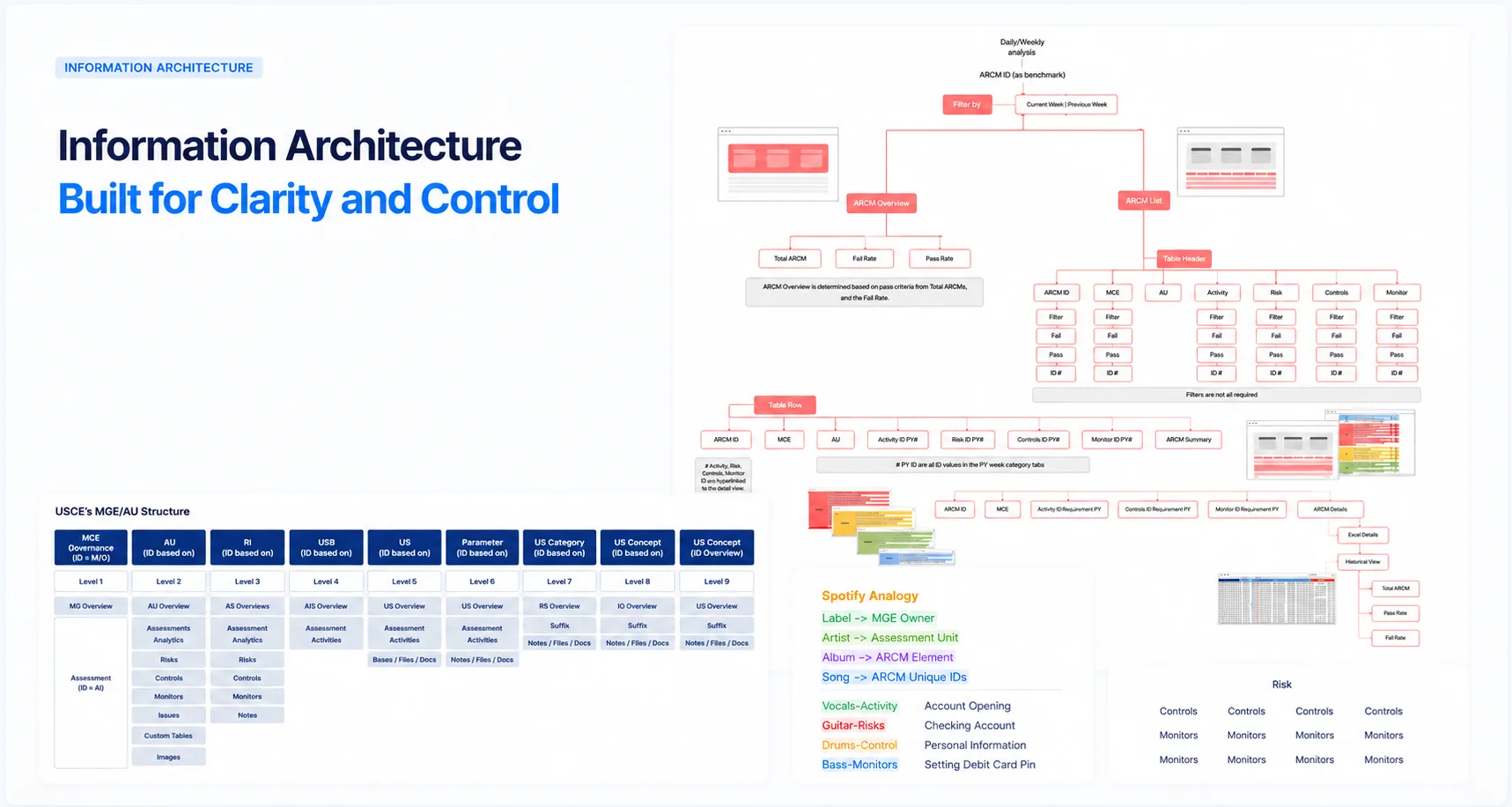
I started with information architecture, organizing an enormous amount of metadata into a hierarchy that made sense to someone triaging their daily queue. User flows came next, then low-fidelity wireframes that I iterated on with the PM, engineers, and analysts until the structure felt right.
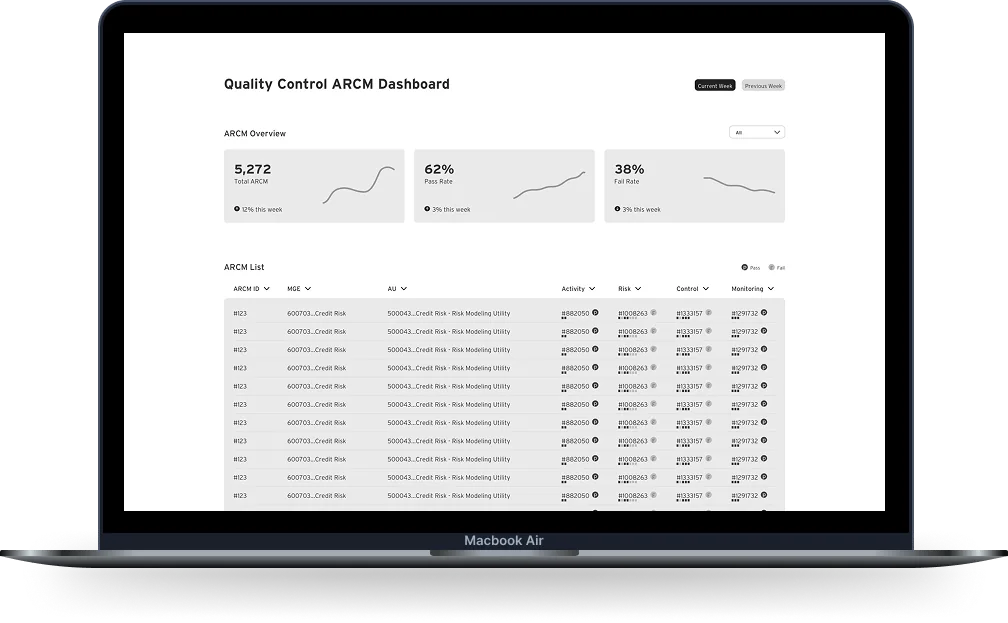
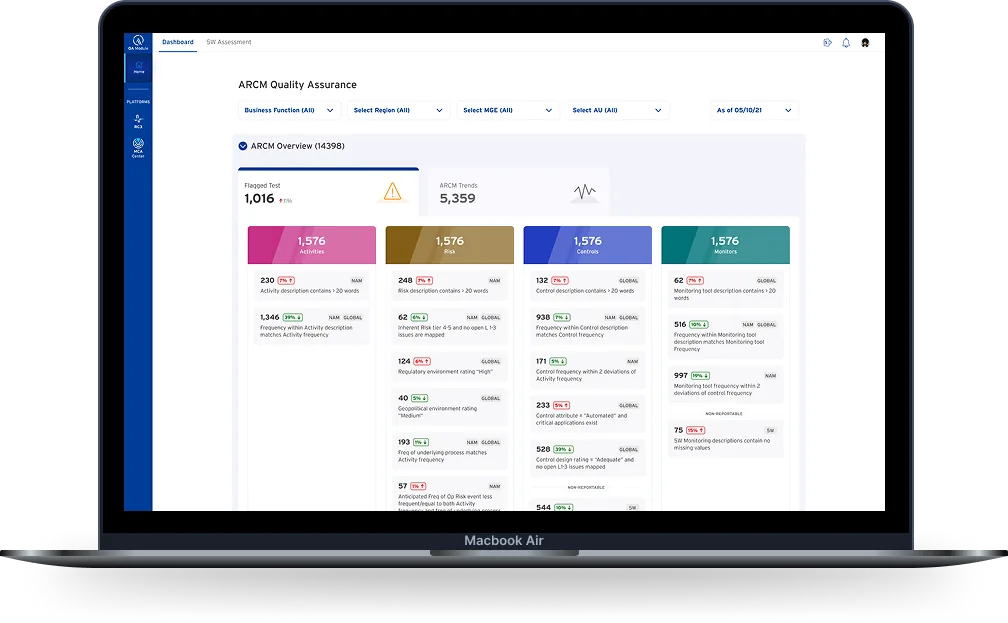
The high-fidelity UI got its own visual language: a color-driven system for ARCM status, a clear typographic hierarchy for dense data tables, and a personal work queue built around what each analyst needed to act on. I prototyped the key flows in Figma and ran rounds of usability testing with real analysts before anything went into the backlog.
The final product was an Angular web application. I worked closely with the engineering team throughout the build, reviewing implementations and making sure what shipped matched what we had designed together.
The outcome
From spreadsheets to one shared tool.
Rollout happened gradually, region by region, with training and a feedback channel analysts could use at any time.
For the first time, analysts could see ARCM quality and flagged items in one place. Embedded analytics helped enforce compliance with policy and procedures, making the right action the obvious one rather than a separate check. And the spreadsheets, slowly, disappeared.
What I took with me
Internal tools deserve consumer-grade design.
The hardest part of this project wasn't designing screens. It was making the case that risk analysts deserved the same care a consumer banking customer would get. The tools that move the most money in the world are often the ugliest ones, and that's a choice, not a constraint.
I also learned what it means to design for a domain you have to earn your way into. The ARCM world has its own language, its own logic, its own priorities, and the only way to design well for it was to understand it deeply before picking up a pen.
The win wasn't the dashboard. It was a quiet shift in how my team thought about its internal users.